




Table of contents
Get in touch
Expect response in 4 hours.
Your content workflow is a mess. Admit it.
It starts fine: a writer drafts in Google Docs. But then the 'comment Tetris' begins. Then comes the manual labor. Copy-pasting that text into WordPress and watching your formatting break in real-time.
While you’re busy fixing line breaks, the designer is chasing images and the SME is redlining a draft you thought was finished yesterday. You’re back in the Doc. You’re back in WordPress. You’re losing your mind. Eventually, someone hits 'Publish' just to make the nightmare stop.
That's not a WordPress editorial workflow. It's a relay race where every handoff is a bottleneck.
The WordPress 7.0 release was built to cut most of those handoffs out.
After nearly a decade of incremental block editor work, 7.0 closes Phase 3 of the Gutenberg project, Collaboration, and does something no WordPress release has done since 5.0 replaced the classic editor: it changes the assumptions underneath the platform, not just the features on top of it.
Three things change: How you create content. How you manage your site. How WordPress handles AI. Any one of those would be a significant release. All three together are a different kind of moment.
Here's the scoop for marketing teams and agencies about WordPress 7.0’s Real-Time Collaboration(RTC): what's shipping and how to get ready without breaking anything live.
WordPress 7.0 real-time collaboration feature release: the current scenario
WordPress 7.0 was supposed to drop on April 9, 2026, during Contributor Day at WordCamp Asia in Mumbai. Three release candidates shipped. Then on March 31, the core team paused the cycle.
The reason is understandable.
Real-time collaboration, the headline feature, stores sync data in a way that disables WordPress's post query cache whenever the editor is open. For a busy editorial team, that's basically all the time. The fix requires a dedicated database table, not a patch. Rather than ship a performance regression to millions of sites, the team stepped back.
Pre-release builds were paused until April 17. A revised schedule was expected by April 22. The final release is now expected mid-to-late May 2026.
The silver lining, though? Everything else in 7.0 is ready. You have weeks to audit your stack, test on staging, and prepare without pressure. Use them.
Why is this WordPress 7.0 release different?
Most WordPress major releases blend into each other after a while. 6.4 brought a new theme. 6.5 improved fonts. 6.6 refined data views. All useful. Disruptive? Not really.
WordPress 7.0 is disruptive, but in the right direction.
When Gutenberg replaced the classic editor in 5.0, teams spent months adjusting. Some never fully did. This WordPress 7.0 update doesn't have that kind of friction, but it has that level of significance.
- The collaboration tools address the workflow gaps that have been driving editorial teams toward Google Docs and Notion for years.
- The DataViews admin redesign modernizes an interface that's been essentially static for a decade.
- And the AI infrastructure doesn't bolt AI onto WordPress; it builds WordPress into the AI ecosystem.
You’ve heard the whispers: 'Is WordPress dying? Is it losing to headless CMS or shiny new AI builders?'
By 2026, that debate is going to look silly. Not because of some flashy marketing hype, but because the core team finally stopped chasing trendy features and started fixing the foundation.
They’re making architecture-first decisions that actually matter for the long haul. If you’re building a serious business on WordPress, this is the win you’ve been waiting for.
The WordPress 7.0 features: What's shipping
1) Real-Time Collaboration ends the post-lock era
Here's a frustration every WordPress editorial team knows intimately.
You open a post to make a quick edit. Someone else already has it open. You're locked out. You message them on Slack. They don't respond for 20 minutes. You do something else. Later, they message you saying they're done. You go back in. This happens multiple times per day on active content sites.
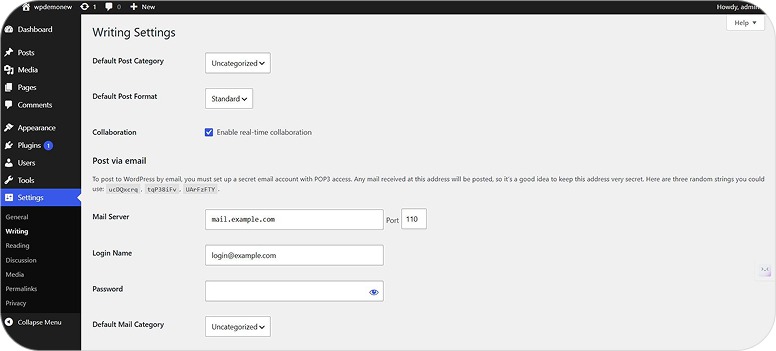
Post locking is gone in 7.0. Multiple editors can now work on the same post simultaneously - live cursors, synced edits, and real-time presence indicators.
An editorial team that beta-tested the feature at a major research institution called it "an amazing workflow change." Their stress tests, dozens of blocks added simultaneously, large amounts of content copied in parallel by multiple users, held up.
2) The hosting question answered upfront
The default sync mechanism uses HTTP polling, not WebSockets. That means co-editing works on standard shared hosting. No infrastructure upgrade required for the baseline experience.
Hosts and plugins can layer WebSocket-based providers on top for lower latency, but you don't need them to get started.
3) The behavioral change to brief your team on
When a second editor opens a post, they don't see a lock screen. They see the post and each other's changes, live. That's the right behavior. But teams discovering it mid-session without warning tend to file support tickets first and ask questions later. Brief your clients and content editors before they encounter this.
4) The caveat that trips up agencies
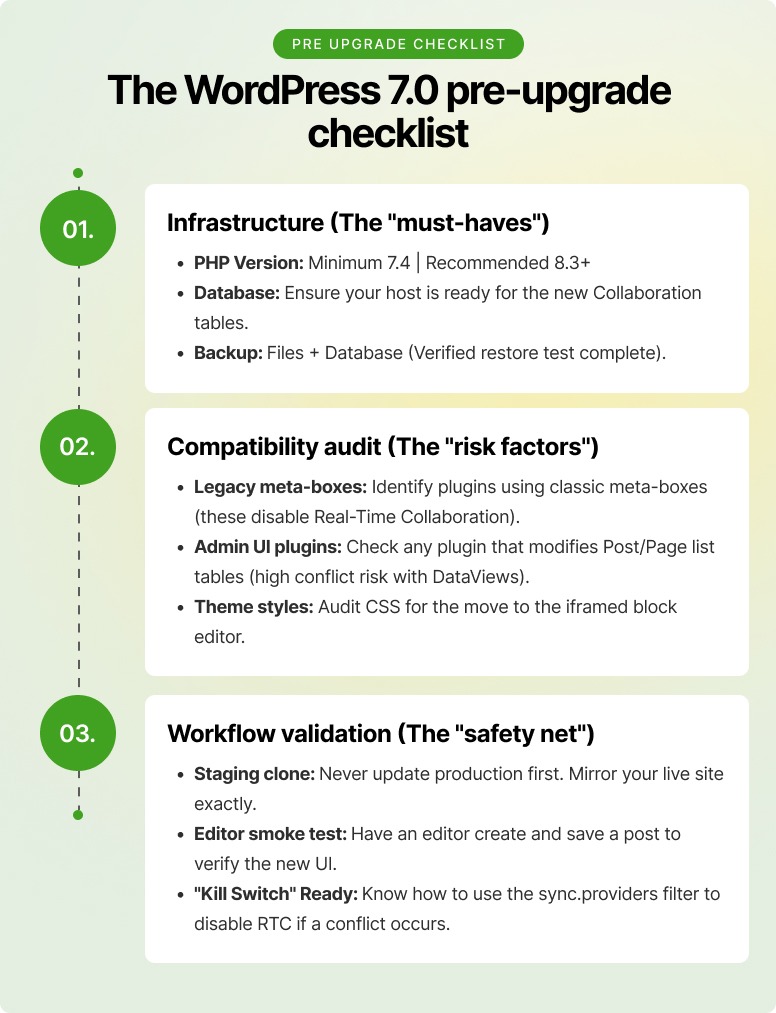
Classic meta boxes disable collaboration entirely for any post that uses them. WordPress falls back to the old locking system. If you're running legacy custom meta boxes on client sites and you've promised clients the co-editing experience, audit those posts first. You don't want to find this out after the promise has been made.
What changes in practice:
- Your legal reviewer, your subject matter expert, and your writer can finish a landing page in a single session instead of emailing versions across departments for three days.
- Content reviews move from asynchronous Slack threads into real-time editing sessions.
- Remote teams work the way they already work in Google Docs, except the content is already where it needs to be, with no copy-paste step and no broken formatting on arrival.
5) Notes and Inline Comments eliminate the review round-trip
WordPress 6.9 introduced Notes — block-level comments inside the editor. 7.0 goes further.
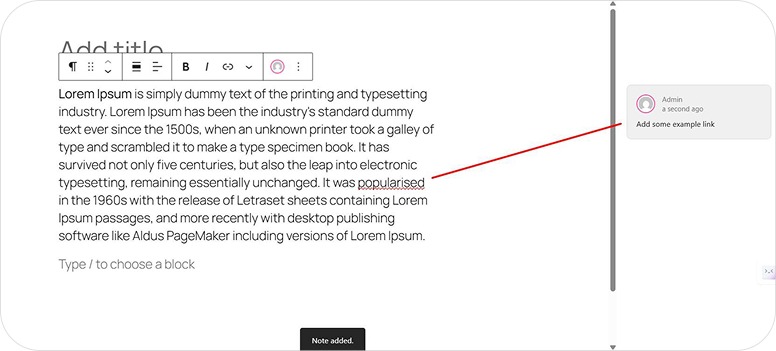
- Editors can now anchor comments to a specific phrase within a block, not just to the block as a whole.
- They can @mention teammates. They can propose edits that writers accept or reject with one click.
- Notifications fire when someone adds a note to a post you authored, so review workflows keep moving even when collaborators aren't in the editor at the same time. Think Google Docs commenting — except the content never leaves WordPress to be reviewed.
For agencies managing client approvals, the practical shift is this:
Your client leaves markup on the actual draft. Your writer sees it in context. The conversation history stays attached to the content. Nothing is in an email chain from three weeks ago. Nothing got lost when someone left the company.
One thing to reassure clients about: Notes are invisible on the frontend. Nothing leaks to the live site. They exist only inside the editor.
6) Visual revisions
The old revision system showed you a text diff. To understand what that meant for the actual page, you had to mentally reconstruct it.
7.0 replaces that with an inline visual comparison.
- Block-level red and green highlights show what was added or removed, directly in the editor.
- A sidebar flags where changes occurred on the page.
- The editor locks into comparison mode during review; you can restore or exit, nothing else, so there's no risk of accidentally editing while you're mid-review.
For teams managing evergreen pages with live campaigns, product pages, service pages, and landing pages that generate leads, this changes how you audit changes before restoring. You're looking at the actual layout, not parsing ‘diffs’.\
7) DataViews: a modern admin for real content operations
The WordPress admin list table has been the same for decades: rigid columns, clunky filters, and zero ways to change layouts.
DataViews replaces it. Configurable columns, filterable views, switchable layouts between table, grid, and list. For sites managing thousands of posts, multiple custom post types, and layered editorial roles, this is the most important change in WordPress editorial workflow.
8) Responsive editing controls fewer custom CSS escape hatches
Designers finally get native device-level visibility controls inside the block editor. You can show or hide blocks on mobile, tablet, and desktop without wiring up custom classes or switching to a page builder plugin.
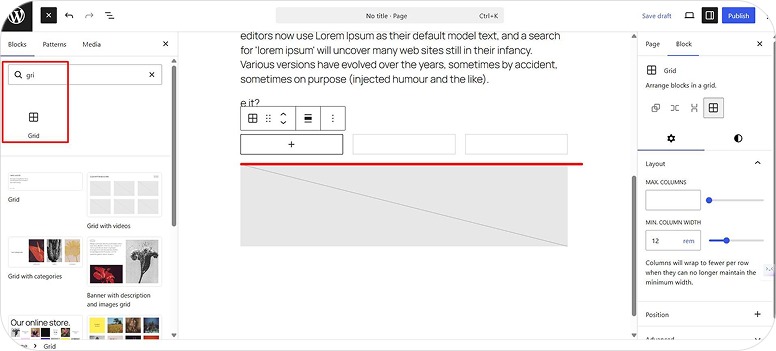
Combined with the new responsive Grid block, video-background support inside Cover blocks, and updated Navigation block with customizable mobile breakpoints and overlay options, 7.0 meaningfully narrows the gap between "native WordPress" and "Elementor / Bricks / Breakdance."
If your team has been maintaining custom CSS just to hide sidebar widgets on mobile, some of that can go away.
9) Viewport-based block visibility stops turning 'simple' mobile changes into developer tickets
The #1 question clients ask is: 'Can we show something different to mobile users?' Until now, the answer was always a headache. You needed custom CSS, a bulky plugin, or a developer on standby.
WordPress 7.0 finally makes it a native toggle. Now, any block, from a 'Tap to Call' button to a full hero section, can be hidden or shown based on the device. No code. No back-and-forth.
That's a meaningful operational change for any agency billing hourly for changes that should have been self-service.
10) Custom CSS per block: Small addition, real daily value
A WordPress 7.0 feature that designers will use constantly: you can now apply custom CSS to individual blocks directly in the block settings, under Advanced → Additional CSS. Quick adjustments without touching theme files or global styles.
For large or repeated styling, global styles and structured CSS are still the right approach. But for one-off tweaks and rapid layout experimentation, this saves real time.
11) The navigation overlay
The mobile hamburger menu has always been the thing clients ask to customize, and developers dread answering. It was unstyled, locked, and required code to change.
In WordPress 7.0 RTC, it becomes a template part built with blocks in the Site Editor. Add your logo, a featured promotion, a search bar, social icons, a styled close button, whatever the client wants. Build it the same way you build everything else on the site.
For agencies, this turns a category of recurring dev tickets into a Site Editor task. A trained client can even maintain it themselves.
Two things to set as expectations upfront before clients get excited:
- Overlays are full-screen only in this release. Sidebar drawer styles aren't supported yet.
- Custom overlays don't survive theme switches. Factor that in if portability matters.
12) The command palette gets smarter
The command palette - the keyboard-driven navigation shortcut that power users rely on - gets meaningful improvements in WordPress 7.0. Faster access across editing, design, and admin tasks in a single interface.
This is the feature that looks like a tiny update on paper. In reality? It’s a game-changer for your daily sanity.
If your editors and developers are still clicking through endless menus to find a setting, you're working too hard. Once the command palette hits your muscle memory, you’ll stop 'navigating' WordPress and start actually using it while saving the extra hour of time every week.
13) Client-side media processing faster publishing, lighter servers
Usually, when you upload a massive image, your server has to scramble to resize and compress it. It’s slow, it burns through CPU, and if you’re on a modest hosting plan, it can practically crawl to a halt.
WordPress 7.0 release flips the script. Now, the image resizing and compression happens right in your browser-using your laptop’s power before the file hits the server. The result? Faster uploads, lighter servers, and no more waiting on clunky plugins to handle modern image formats.
It’s a performance win that costs you nothing and saves your server from an early grave.
14) AI Integration — The Plumbing That Makes Everything Else Possible
WordPress 7.0 updates ship two connected systems that won't feel like much at launch but will matter considerably by year-end.
- The Abilities API gives WordPress a standardized way to expose site capabilities to AI tools, both from the PHP side (which landed in 6.9) and now the JavaScript side.
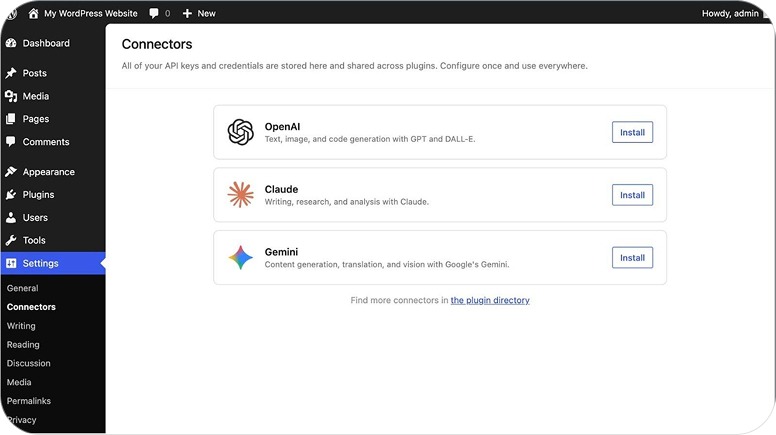
- The Connectors dashboard under Settings lets non-technical admins configure an AI provider once, and have every compatible plugin use it without separate setup.
Which means:
- Alt text generation, content summaries, translation drafts, layout suggestions, all from a single configured provider.
- The deeper implication for search. AI-driven discovery is already changing how content gets found. The Abilities API is part of how WordPress positions sites to be legible to that landscape.
- 7.0 also ships MCP (Model Context Protocol) support. Meaning, WordPress is actively designed to work with AI agents, not just tolerate them. That’s a plus for any business planning about their content citations in an AI-first search environment.
New blocks that retire plugin dependencies
1) Breadcrumbs block
Renders navigation paths automatically based on page context.
Supports primary category selection for posts in multiple categories, customizable separators, and full SEO-friendly markup.
For e-commerce sites, large content hubs, and documentation sites, native breadcrumbs were long overdue.
2) Icon block:
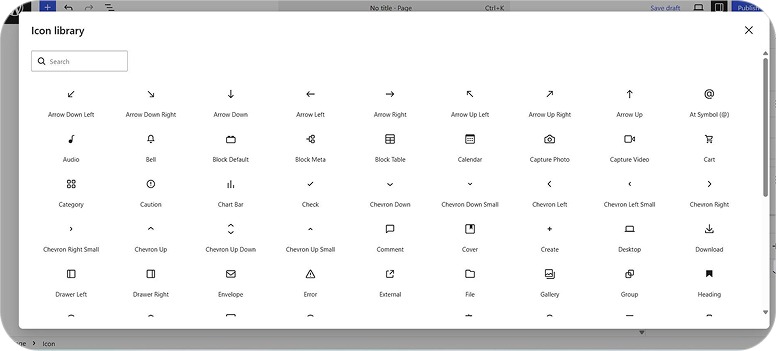
SVG icons, directly in the editor, without a plugin. An API covers custom icon sets if you need them.
The workaround- custom HTML blocks or third-party icon plugins for simple glyphs- is gone.
3) Gallery lightbox:
Click any gallery image to open it full-screen, navigate with keyboard or pointer. Portfolio sites, product galleries, and media-heavy pages get this with no plugin required.
For agencies, this is valuable because fewer plugins mean smaller attack surface, lower maintenance overhead, and faster sites. Every plugin you remove is one fewer compatibility concern during the next major update.
What's going away
PHP 7.2 and 7.3 support has been dropped. Both have been past their security end-of-life for years.
If your hosting is still on either version, you have two options:
- Upgrade PHP before the stable release lands.
- Stay on 6.9 (which keeps receiving security patches for a defined window).
If you ask us, upgrading is the right call in almost every case. Modern PHP is faster, more secure, and increasingly required by the plugins teams depend on anyway.
PHP minimum: 7.4. Recommended: 8.3 or higher.
The iframed block editor migration also begins in 7.0 and completes in 7.1. Themes relying on editor styles enqueued outside the iframe will need updates. Any scripts referencing the global document object need to be reviewed. This is the most likely source of subtle visual regressions on custom or older themes. Test these specifically on staging before upgrading any production site.
What comes after WordPress 7.0 changes
WordPress is returning to three major releases per year. Here's the roadmap:
- WordPress 7.1 — August 19, 2026: Continued iteration on collaboration, media workflow improvements, more granular user permissions, and DataViews extensibility. Advanced connector filtering — which the core team explicitly chose not to ship in 7.0 rather than ship it unfinished — moves here.
- WordPress 7.2 — December 2026: Continued Phase 3 collaboration work and groundwork for native multilingual support, which is a Phase 4 feature that has been anticipated for years.
That choice to defer advanced connector filtering is worth noting. The instinct to ship everything on the announced date is one of the things that has historically made WordPress upgrade cycles painful. The 7.0 team chose not to. That's a signal about how this release cycle is being managed- and it's an encouraging one.
The honest agency view: should you rush to upgrade?
No.
And not because 7.0 isn't ready. Because version X.0.0 of anything is always where real-world configurations surface that controlled beta testing never found. The global WordPress community will find those edge cases within days of release.
A few weeks later, 7.0.1 arrives with the fixes already in it. That's the version worth deploying to production.
The sites that upgrade on day one are doing extended beta testing on live environments. You don't need your clients' sites in that category.
Here's how to sequence it based on your situation:
Simple site, low plugin count, maintained theme: Wait 2–3 weeks post-release, then upgrade after a staging test. Risk is low.
Content-heavy site, editorial team of three or more: Start testing on staging with 7.0 nightly builds now. Know how DataViews interacts with your custom post types before the final release. Plan the live upgrade 3–4 weeks post-stable.
WooCommerce store, complex plugin stack, custom theme: Full compatibility audit on staging. Check everything that touches admin list views, custom blocks, or the editor. Budget 4–6 weeks post-stable. If you're approaching a peak season, push past it.
Multisite, enterprise publishing, mission-critical: Full staging mirror. Automated visual regression tests. Coordinated rollout. Don't rush.
What "Good WordPress" looks like after this
- Collaboration is mandatory
The old "post lock" UX now looks as dated as Internet Explorer. Your team will expect real-time sync.
- AI is an asset, not an add-on
Standardized AI connectors mean "AI-ready" is now a baseline for any growth-focused site.
- Native over plugins
With improved responsive controls and breadcrumbs, the need for heavy page builders (like Elementor) is shrinking. Native is faster and more stable.
- Continuous Maintenance is Strategic
You can't "build and forget" a site anymore. WordPress 7.0 will need active management of your PHP, hosting, and plugin stack.
A final word
The delay on 7.0 isn't bad news. It's the core team choosing to get the foundations right rather than ship a performance hit to every editorial team on the planet. The collaboration database architecture being rebuilt now is what every site will depend on for the next five years, worth the few extra weeks.
In the meantime, use the window. Audit your hosting, lock in your PHP version, run a plugin compatibility review, and get a staging clone ready. By the time the new release date lands, your upgrade will be a routine deployment rather than a weekend of firefighting.
And if you'd rather hand the whole thing off audit, staging, compatibility fixes, managed upgrade, post-launch monitoring that's exactly what our WordPress team handles day in, day out across enterprise, agency, and high-traffic publishing setups.
Planning your WordPress 7.0 upgrade? Talk to our team and we'll walk you through a zero-surprise migration path built around your site's real risk profile.
Frequently asked questions
When is WordPress 7.0 actually releasing?
The original April 9, 2026 date was postponed. Mid-to-late May 2026 is the current expectation. The Make WordPress Core blog is the only authoritative source for a confirmed date.
Should I upgrade the moment it drops?
Wait for the first patch release, typically a few weeks after the point-zero. That's when real-world edge cases the beta cycle missed are already fixed. The features don't change. The stability only improves.
Will my plugins and themes still work?
Actively maintained plugins and themes, in most cases, yes.
Highest risk: plugins using classic meta boxes, anything customizing admin list views, and themes that haven't updated editor styles for the iframed editor. Test on staging before touching production.
Do I need to upgrade my hosting?
PHP 7.4 is the minimum. PHP 8.3 or higher is strongly recommended. On 7.2 or 7.3, upgrading PHP is mandatory before 7.0.
Does real-time collaboration require special hosting?
No. The default HTTP polling sync works on standard shared hosting. WebSocket support is optional, available for lower-latency editing if your host supports it.
Is co-editing secure?
Yes. WordPress Collaboration tools use the same authentication as the rest of the WordPress dashboard. Only users with existing editor-level access can join a session. Your permission structure doesn't change. It just operates in real time instead of sequentially.
What if I stay on WordPress 6.9?
Security updates continue for a defined window. Reasonable short-term choice if PHP isn't ready. Not a long-term plan- migrate before the support window closes.
Can I use the AI features immediately?
The infrastructure ships with WordPress 7.0. The AI-powered features come from plugins built on top of it. Expect a wave of updated AI plugins in the months following the stable release.
Will real-time collaboration work on posts with classic meta boxes?
No. If a post has classic meta boxes present, WordPress 7.0 disables collaboration mode for that post and falls back to standard post locking. Audit your meta box usage before upgrading. Especially before promising clients the co-editing experience on specific post types.

.png)
.png)